
01
Real-Time Fleet Radar
Track all on-field technicians live on a centralized interactive map with pinpoint GPS accuracy, travel speed, and heading.
Know where your field technicians are anytime. Dispatch the closest technician, monitor fleet status, and manage field operations on real-time interactive maps — all without expensive vehicle hardware.
Zero hardware required · 14 days free · Instant phone setup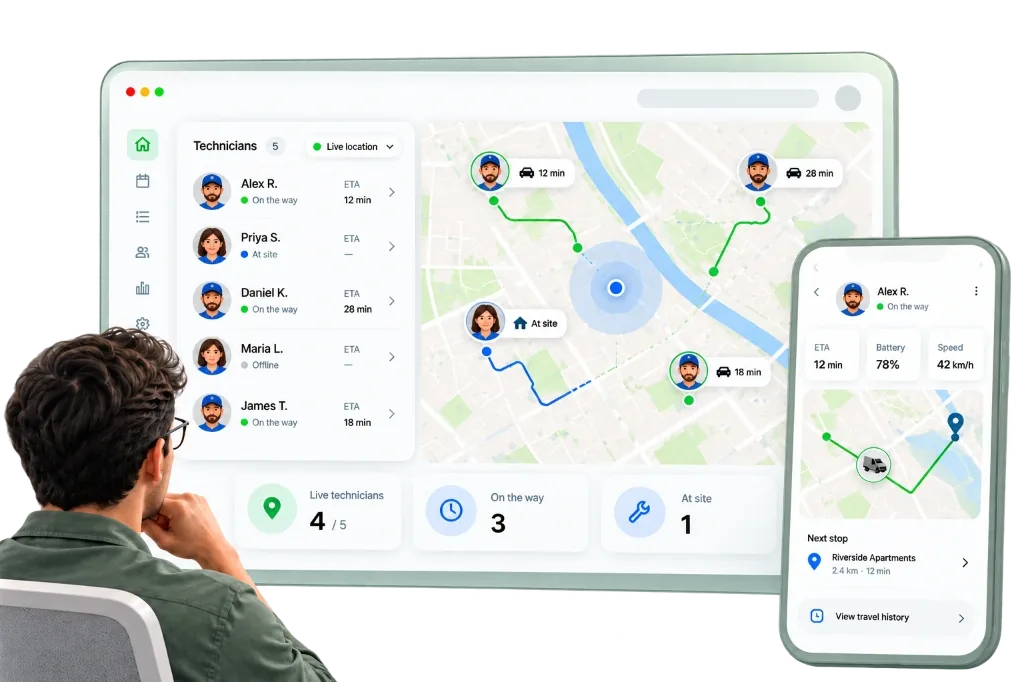
Simple for technicians on the road, crystal-clear for office dispatchers. Built specifically for modern service operations.
Track all on-field technicians live on a centralized interactive map with pinpoint GPS accuracy, travel speed, and heading.
Switch effortlessly between Standard street roadmaps, high-resolution Satellite photography, and Hybrid terrain views.
Turn Live Location on or off for individual technicians anytime with a single toggle under User Settings.
Quickly locate and assign the nearest available technician to high-priority customer calls to slash arrival wait times.
Runs reliably on standard iOS and Android smartphones — zero costly OBD devices, vehicle wiring, or maintenance fees.
No complex hardware, no vehicle OBD installation. Set up in under two minutes.
Navigate to Settings → Users in your NeyoDesk web dashboard and select the technician or staff member you wish to track.
In the user profile (where attendance is configured), toggle on the 'Enable Live Location' switch to authorize location tracking.
A dedicated 'Live Location' tab appears in your admin left navigation menu. Click it to open the centralized fleet radar console.
View all your technicians live on the map. Zoom into exact street positions, monitor activity in real time, and toggle between Standard, Satellite, and Hybrid map layers.

Manage your entire service operation from anywhere. Assign technicians, update ticket statuses, print barcode labels and view business analytics from iOS or Android.
14 Days Free Trial / No Card Needed
Perfect for single service centers or growing service operations getting started.
Start Free TrialBest value for growing service teams with full multi-branch capabilities.
Start Free TrialNeyoDesk utilizes the built-in GPS on your technicians' existing smartphones via the NeyoDesk mobile app. When enabled, location coordinates stream securely to the admin fleet radar in real time.
Simply go to Settings → Users, edit the technician, and turn on the 'Enable Live Location' toggle. It takes just one click.
Yes! The Live Location map console features an instant view switcher, allowing you to toggle between Standard street view, high-resolution Satellite imagery, and Hybrid mode.
No extra hardware is required! NeyoDesk runs entirely on standard iOS and Android smartphones, saving your business thousands in hardware, SIM, and installation fees.
Yes. Live Location can be enabled or disabled individually for any user at any time from Settings → Users.
Track field technicians, speed up customer dispatch, and save thousands on hardware with NeyoDesk Live Location.
14 days free · No credit card required · Instant mobile setup